How to Launch an iOS App in 2026: A Step-by-Step Playbook
Most launch guides tell you to "optimize your App Store listing" and "leverage social media." That advice isn't wrong — it's just incomplete. The developers who consistently see traction on launch day are working a specific system: pricing mechanics, algorithm timing, and keyword-level data that most indie developers never look at.
Here's how that system works.
Step 1: Lead With a Free Offer
The first thing to configure before launch is a free tier or promotional offer in App Store Connect — a free trial, an introductory offer, or a temporary price drop.
Why? Because the App Store ecosystem has a built-in distribution mechanism that most developers don't use.
Third-party deal-tracking sites constantly monitor the App Store API for price changes. When yours drops, they automatically surface it to their audiences. Sites like AppRaven (AppSliced), 9to5Toys, iGeeksBlog, AppStore-Discounts.com, and TickGiveaway all run daily roundups of apps that have gone free or discounted. Reddit communities like r/AppHookup pick these up as well.
Some of these platforms — like iGeeksBlog and AppStore-Discounts — let developers submit their apps directly ahead of a price drop. That's free distribution to an audience that is actively looking for new apps.
Test your offer types. App Store Connect supports introductory offers, promotional offers, offer codes, and win-back offers (added in 2024). A free trial and a discounted annual subscription will convert very differently depending on your app category. Run both and measure.
One operational note: Apple is deprecating legacy promo codes for In-App Purchases as of March 2026, replacing them with Offer Codes. If your launch plan still references promo codes, switch now — Offer Codes have better configuration and eligibility controls anyway.
Step 2: Understand the 48-Hour Honeymoon Window
When a new app launches, the App Store algorithm temporarily boosts its ranking for relevant keywords. This is Apple's way of evaluating whether a new app deserves sustained organic visibility.
That window is approximately 48 hours — and it's the highest-leverage moment in an app's entire lifecycle.
During this period, Apple is measuring conversion signals:
Tap-to-install rate — What percentage of people who see the listing actually download it?
Retention — Are users returning to the app after installing?
Complaint signals — Refund requests, one-star reviews, support contacts
Strong signals during this window can establish ranking positions that are very hard to achieve through organic optimization alone later. Weak signals cause rapid ranking drops that are equally hard to recover from.
What this means operationally: the app needs to be fully polished at launch, not MVP-polished. Onboarding should be frictionless. The value proposition should be clear within the first 30 seconds. Bugs that would prompt refund requests or 1-star reviews need to be caught before launch, not after.
Avoid launching on Fridays or around holidays. Launch early in the week, when there's time to monitor feedback and push a fix if something breaks.
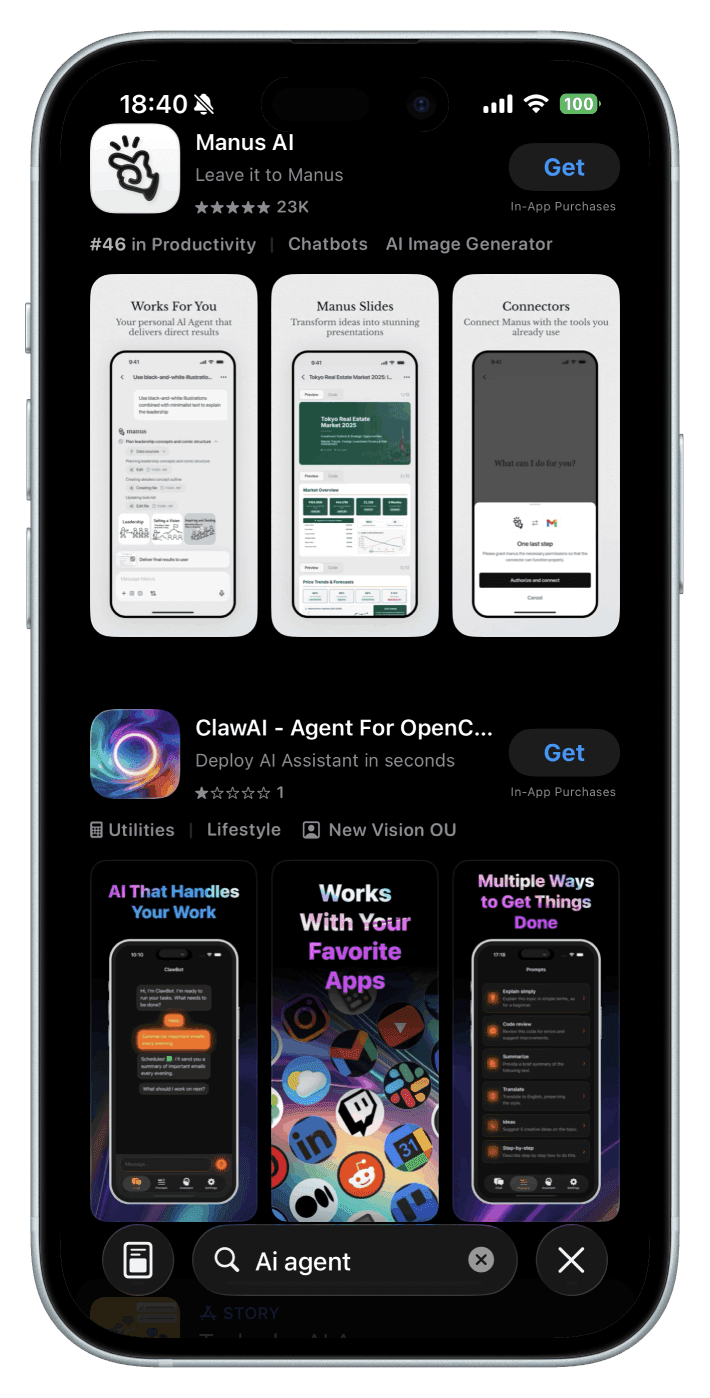
Two apps appearing for the same search. The difference isn't just the product — it's ratings, conversion signals, and how well each app performed during its launch window.
Step 3: Run a Lifetime Deal to Build Social Proof
Once past the honeymoon window, the next priority is accumulating ratings and reviews — the social proof that converts browsers into downloaders.
A useful rule of thumb: expect roughly one App Store rating per 100 free lifetime subscriptions distributed. That's the typical conversion rate. Ten ratings requires approximately 1,000 lifetime subs.
What those ratings buy, in turn, is meaningful: better conversion rates on your listing, improved ranking signals, and credibility for every paid acquisition campaign that follows.
Channels to promote a lifetime deal in 2026:
iGeeksBlog — daily "Apps Gone Free" coverage, accepts developer submissions
AppRaven / AppSliced (appsliced.co) — active audience browsing for free and discounted apps
9to5Toys — high-readership daily deal roundups
AppStore-Discounts.com — free developer submission ahead of price drops
TickGiveaway — daily iOS giveaway promotions
MacRumors Forums — developer section; threads accumulate views over weeks
HackingWithSwift — app announcement section for the iOS developer community
ProductHunt — still relevant for apps with a novel angle
r/AppHookup — active community of deal-seekers
Step 4: Don't Get Caught by the Timezone Trap
This is an account-safety issue that doesn't get enough attention.
When running a limited-time free promotion, keep the offer live for at least one full day longer than the promotion window. If promoting a 2-day free offer, keep it free for 3–4 days.
The problem is timezones. If a promotion ends at midnight Pacific Time, a user in Australia or Southeast Asia might see it shared on social media, go to download it, and find the price has already reverted. They pay full price expecting the deal they saw — and they request a refund.
A handful of refund requests is normal. A wave of them in a short window is not. Apple monitors refund request patterns, and a spike can trigger an account review, put app distribution on hold, or in serious cases, lead to account action.
The fix is simple: pad the promotion window generously. The marginal cost of an extra day of free downloads is negligible. The cost of an account flag is not.
Step 5: Use Apple Search Ads to Generate Keyword Signals
Organic keyword optimization is a long game. For new apps with no ranking history, relying on it alone means waiting months for the algorithm to understand what the app is relevant for.
Apple Search Ads accelerates that process. When a user searches a keyword, taps the ad, and installs the app, that's a direct conversion signal to Apple's algorithm that the app is relevant to that term. Over time, those signals improve organic ranking — so paid spend compounds into organic visibility.
Start with a Search Results campaign targeting 20–30 keywords relevant to the app's core use cases. The initial goal isn't profitability — it's data collection. Set a modest daily budget and let campaigns run for at least two weeks before drawing conclusions.
Step 6: Find the 3–5 Keywords That Actually Drive Revenue
This is where most developers stop too early — and where the biggest gains are.
Apple Search Ads shows which keywords drive installs. Installs are not revenue. The keyword with the highest install volume often has the worst subscription conversion rate. The keyword with 10 installs per week might convert at 40%.
The question that matters: which keywords drive paying subscribers, and at what revenue per install?
Apple Search Ads doesn't answer this question natively. It reports cost-per-install and tap-through rate, but has no visibility into what happens after the install — whether a user starts a trial, converts to paid, or churns.
If the app uses RevenueCat, the subscription data exists — it's just not connected to keyword data by default. The manual approach is to export keyword data from Apple, match it against RevenueCat subscription events, and maintain an attribution spreadsheet. It works, but it's tedious and goes stale fast.
Tools like AppSkale automate this connection — linking Apple Search Ads keyword data directly to RevenueCat revenue events, so keyword-level ROAS is visible in a single dashboard without the spreadsheet work.
However you approach it, the goal is the same: identify 3–5 keywords where ad spend produces measurable subscription revenue. Once those are known:
Scale spend on profitable keywords
Optimize the App Store listing around those terms — title, subtitle, keyword field
Inform the roadmap — high-converting keyword clusters reveal what the market actually cares about
Cut spending on keywords that drive installs but not revenue
Most developers never close this loop. The ones who do have a compounding advantage: every optimization is grounded in revenue data rather than install volume.
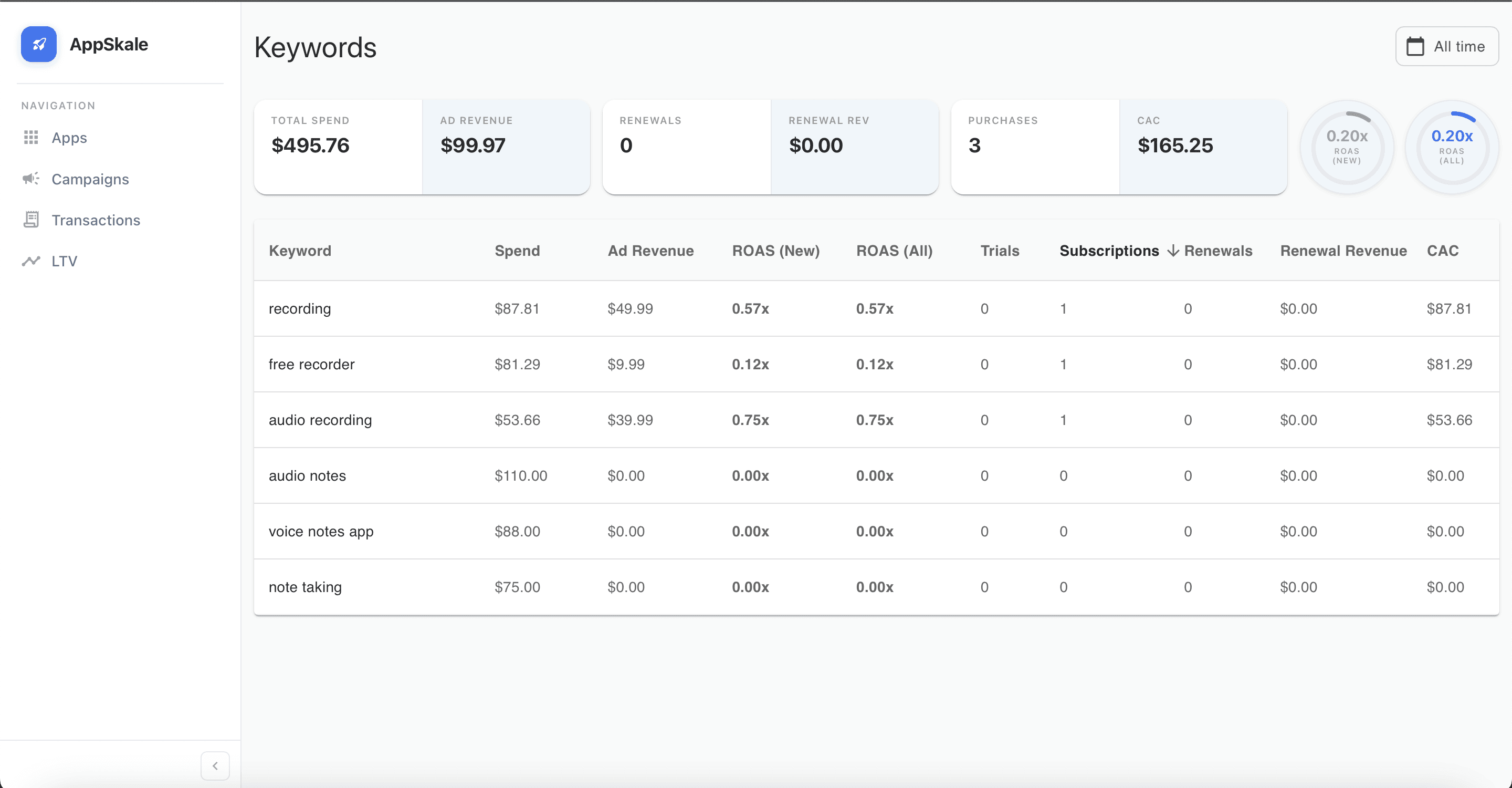
A keyword dashboard showing spend and ROAS across six keywords. Some are converting. Some aren't. The data makes it obvious which to scale and which to cut.
The Full Timeline
Week 1 — Launch with a free offer. Monitor conversion signals closely during the honeymoon window. Fix anything that generates complaints.
Weeks 2–3 — Run the lifetime deal. Submit to deal sites. Accumulate ratings. Pad the promotion window for timezone coverage.
Weeks 3–6 — Start Apple Search Ads. Target 20–30 keywords. Let data accumulate.
Week 6+ — Analyze keyword-level revenue. Identify the 3–5 money keywords. Reallocate budget. Optimize the listing. Scale what converts.
A Note on the Deal Aggregator Ecosystem
The deal aggregator landscape is smaller than it was in 2018. AppAdvice and AppShopper are gone. Several notification apps that alerted users to every price drop have shut down.
But the underlying mechanic is intact: change a price, and the remaining ecosystem picks it up. Combine that with the honeymoon algorithm window, a strategic lifetime deal, and keyword-level revenue attribution, and there's a launch playbook that works — without requiring a large marketing budget or a PR agency.
The App Store rewards developers who understand its systems and measure the right things. Install counts aren't the right thing. Revenue by keyword is.
AppSkale connects Apple Search Ads to RevenueCat so you can see which keywords drive subscription revenue — not just installs. Set it up in 10 minutes.
