Does Apple Search Ads spend actually affect your organic App Store ranking?
Yes — but with a catch. Apple's algorithm rewards install velocity, and paid installs count the same as organic ones. So if you're outspending your competitors enough to drive significantly more installs on a keyword, your rank will move.
The catch is that "enough" varies wildly by keyword, category, and competition. A $50/day budget might dominate a niche keyword and not move the needle on a competitive one. And you can't see whether it's working without putting paid spend and organic rank on the same chart — which most tools don't show you.
This post walks through how the relationship actually works, the three patterns you'll see in real data, and one specific play (brand keyword bidding) that most developers miss.
Why this question is hard to answer
Apple Search Ads shows you spend, taps, and installs. App Store Connect doesn't really show you keyword-level organic rank — for that, you need a third-party rank tracker like AppTweak or AppFigures.
The two live in different tools. So unless you're exporting both into a spreadsheet every week, you never get to see paid spend and organic rank side by side. Most developers don't, which means most developers run ASA campaigns without knowing whether their bids are actually pulling rank up or just buying installs they'd have gotten anyway.
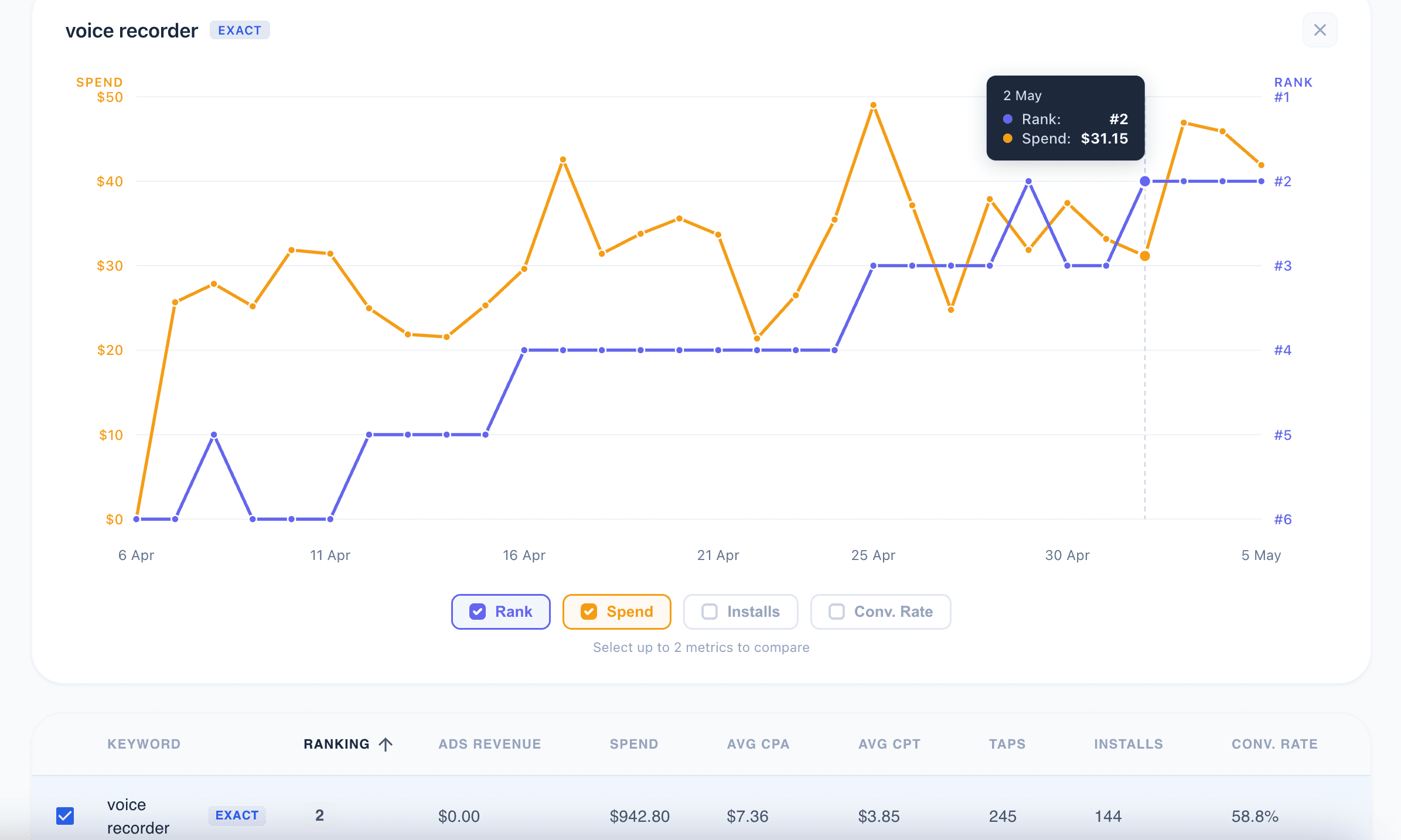
Spend ramps from $0 to ~$40/day. Rank moves from #6 to #2 over the same period. The two lines track each other closely. Without seeing both on the same timeline, you'd never know the bidding was doing organic work — you'd just see your install count going up.
What Apple has confirmed
Apple has publicly stated that installs from paid ads count toward the same App Store ranking algorithm as organic installs. They don't disclose the weighting. What we know in practice:
Higher install velocity for a keyword improves your rank for that keyword
The lift fades if you stop spending — how fast depends on competition and category
Some keywords respond strongly to paid spend, others barely move
The honest part: nobody outside Apple knows the exact weight, and it changes. What you can do is observe patterns in your own data.
Over enough campaigns, the same patterns show up again and again. Recognizing which one your keyword is in tells you whether to keep bidding, pause, or test something different. Here are the three you'll see most often.
Three patterns in real ASA data
Pattern 1: Spend pulls rank up, rank holds
You ramp up bids on a keyword over a few weeks. Rank improves from, say, #6 to #2. You hold the bid steady, rank stays at #2. This is the cleanest "spend works" pattern, and it's what most developers hope for when they start ASA campaigns.
Pattern 2: Spend doesn't move rank at all
High sustained spend, rank stays flat. This usually means one of two things: the keyword is too competitive for your install volume to move the needle, or you're getting installs but they're not the right users (low retention signals back to Apple that your app isn't the right answer for that search).
This is the pattern that costs developers the most money — you're spending, but nothing's improving.
Pattern 3: Rank improves AFTER you stop spending
This one is counter-intuitive but common. You bid heavily for a few weeks. Rank doesn't move much during the paid period. Then you pause the campaign — and rank improves over the next 2-3 weeks.
What's likely happening: the paid period accumulated enough installs to kick the algorithm. Once the algorithm started ranking you higher organically, the organic traffic took over. Pausing the campaign reveals that the organic lift was there all along — you just couldn't see it because paid spend was masking it.
If you don't track rank against spend, you'll never see this pattern, and you'll keep paying for traffic you could be getting for free.
The brand keyword play nobody writes about
Here's a tactic that comes from running ASA campaigns at real spend, not from theory.
There are brands with strong web presence that don't have an iOS app. Their users search for them on the App Store anyway — and find nothing native. If you bid on those brand keywords with a relevant app, you can rank #1 for that brand term with relatively little spend, because:
The intent is pure: someone typed the brand name
There's no competitor app to lose installs to
Install rate is high, which Apple weights as a strong relevance signal
Once you're ranked #1 organically, you keep getting the traffic without bidding
A concrete example from one of my apps: Audiomind ranked #1-2 for "murf ai" on the App Store. Murf AI is a well-known AI voice generation tool, but they're web-only — no native iOS app. People searching "murf ai" on the App Store would find Audiomind. On the right brand keyword, this kind of arbitrage can drive 40% of an app's total traffic.
A few things have to line up for it to work:
Your app has to be a legitimate alternative to the brand (not a deceptive clone)
The brand has to actually generate App Store search volume (some brands are web-search only)
You need to keep an eye on whether the brand launches an iOS app — when they do, the arbitrage closes
Brand keyword bidding doesn't show up in most ASA strategy guides because it requires experience to spot the opportunities. The keyword research tools won't flag "this brand has no iOS competitor." You have to know to look.
Why most tools don't show you the spend-vs-rank relationship
ASA dashboards show spend and installs but no organic rank
Rank trackers (AppFigures, AppTweak, MobileAction) show rank but not your paid spend
MMPs (AppsFlyer, Adjust) show revenue attribution but not organic rank
Spreadsheets work until you have more than a handful of keywords or campaigns
This is why I built AppSkale — to put spend and rank on the same chart for each keyword, so you can see the relationship at a glance instead of stitching exports.
How to test this on your own keywords
You don't need a tool to start. Pick one keyword you're bidding on. Track these for the next 4 weeks:
Daily organic rank (any rank tracker will do)
Daily spend on that keyword (from ASA)
Daily install count from ASA
Plot them on the same chart. Look for one of the three patterns above. Be honest about which one you're seeing.
A few practical notes:
Track rank daily, not weekly — Apple's algorithm updates faster than weekly
Wait at least 3-4 weeks before drawing conclusions — small samples lie
Watch for confounders like seasonality, competitor launches, or App Store featuring
For the brand keyword play, pick a competitor that exists on web but not iOS. Bid on their brand term. Run it for 2-3 weeks. Watch what happens to your organic rank for that keyword.
The honest take
ASA spend can affect organic rank, but the relationship isn't automatic. Some keywords respond strongly, some don't move at all, and some only show their value after you stop spending. The only way to know which is which for your app is to track both metrics on the same timeline.
If you're running ASA campaigns and not watching organic rank against spend, you're flying with one eye closed. The keywords where paid spend actually does work are not always the obvious ones — and the ones where it doesn't are quietly burning your budget.
